
- For PC
- For MAC
- For Linux
- OS: Windows 10 (64 bit)
- Processor: Dual-Core 2.2 GHz
- Memory: 4GB
- Video Card: DirectX 11 level video card: AMD Radeon 77XX / NVIDIA GeForce GTX 660. The minimum supported resolution for the game is 720p.
- Network: Broadband Internet connection
- Hard Drive: 23.1 GB (Minimal client)
- OS: Windows 10/11 (64 bit)
- Processor: Intel Core i5 or Ryzen 5 3600 and better
- Memory: 16 GB and more
- Video Card: DirectX 11 level video card or higher and drivers: Nvidia GeForce 1060 and higher, Radeon RX 570 and higher
- Network: Broadband Internet connection
- Hard Drive: 75.9 GB (Full client)
- OS: Mac OS Big Sur 11.0 or newer
- Processor: Core i5, minimum 2.2GHz (Intel Xeon is not supported)
- Memory: 6 GB
- Video Card: Intel Iris Pro 5200 (Mac), or analog from AMD/Nvidia for Mac. Minimum supported resolution for the game is 720p with Metal support.
- Network: Broadband Internet connection
- Hard Drive: 22.1 GB (Minimal client)
- OS: Mac OS Big Sur 11.0 or newer
- Processor: Core i7 (Intel Xeon is not supported)
- Memory: 8 GB
- Video Card: Radeon Vega II or higher with Metal support.
- Network: Broadband Internet connection
- Hard Drive: 62.2 GB (Full client)
- OS: Most modern 64bit Linux distributions
- Processor: Dual-Core 2.4 GHz
- Memory: 4 GB
- Video Card: NVIDIA 660 with latest proprietary drivers (not older than 6 months) / similar AMD with latest proprietary drivers (not older than 6 months; the minimum supported resolution for the game is 720p) with Vulkan support.
- Network: Broadband Internet connection
- Hard Drive: 22.1 GB (Minimal client)
- OS: Ubuntu 20.04 64bit
- Processor: Intel Core i7
- Memory: 16 GB
- Video Card: NVIDIA 1060 with latest proprietary drivers (not older than 6 months) / similar AMD (Radeon RX 570) with latest proprietary drivers (not older than 6 months) with Vulkan support.
- Network: Broadband Internet connection
- Hard Drive: 62.2 GB (Full client)
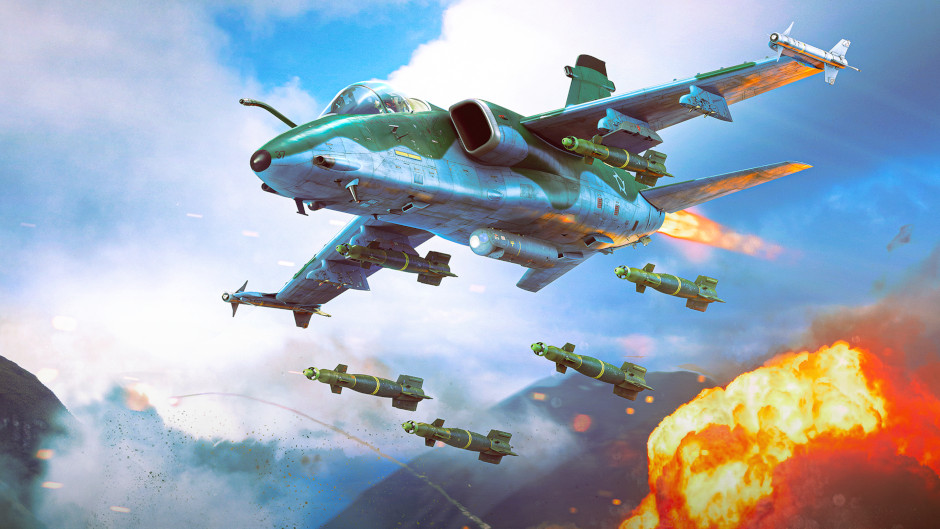
CCRP Bombing, now simple and easy to understand!
In the upcoming major update, we’ve reworked the controls for CCRP (Constantly Computed Release Point) bombing. The previous mechanic was sufficient when CCRP was a niche tool used by only the most experienced pilots. However with the introduction of Nuclear Escalation, using the automated system to drop nuclear bombs, CCRP has become the primary method for delivering a nuclear strike. The old interface however does have some drawbacks. We’ve redesigned the system so that it no longer interferes with standard bomb dropping or clutters half the screen.
What were the current drawbacks? The bomb-release button was used for both CCRP and manual release, causing the two functions to conflict. Once CCRP bombing mode was enabled, it was no longer possible to drop a bomb manually. This is a big problem when dealing with nuclear weapons in Nuclear Escalation. Plus, the option to arm the release mechanism at the start of a run would completely break manual release if a target point had been set using the optical sight. Players would only discover this at the worst possible moment, right when they needed to drop their payload. Lastly, the on-screen indicators took up too much space, and the requirement to hold down the release button proved highly inconvenient.
The new version addresses all of these issues. It requires no dedicated button, does not conflict with the standard release function, and uses a simple, uncluttered display. The auto-release indicator is now positioned within the battlefield view in a way that does not obstruct visibility. Manual bomb release is now possible, even when a point of interest is active. We aimed to ensure the mechanic works predictably, eliminating any guesswork regarding why a bomb might fail to release from a pylon. CCRP bombing is now more convenient across level flight, dives, and pull-up maneuvers. In the latter case (toss bombing), the indicator sticks to the bottom of the screen, allowing for continued monitoring of timing and heading.
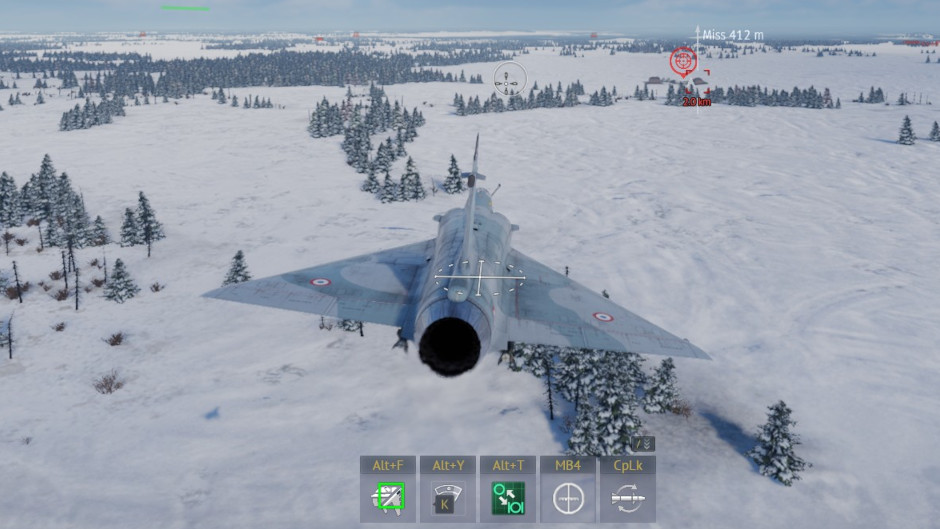
For those just learning the ropes of CCRP bombing, here’s a quick refresher on how it works. CCRP allows you to drop bombs on a pre-designated point on the ground, even if you cannot see it directly. By designating a target (using the “Activate Point of Interest” button, default key: Alt + Middle Mouse Button or MMB click on a minimap), a red targeting box appears on the ground at that location. Activate the automatic release icon (found in the quick-action panel) or assign a dedicated keybind in the control settings menu. A vertical directional arrow appears in the target point, complete with the required heading, the deviation of the current heading from the set value, and an indication of the time remaining until target. Once the automatic release indicator aligns with the crosshairs of the bombsight, the system will automatically release the bomb at the right moment. If the deviation from the course is significant, the release will not occur; the indicator will remain gray and will display the current course deviation. You can use the weapon selector (Caps Lock or Left Shift + S) to choose which bombs to drop and in what quantity, whether a single bomb, a pair, or a salvo (the quantity selector is bound to Left Shift + B by default).
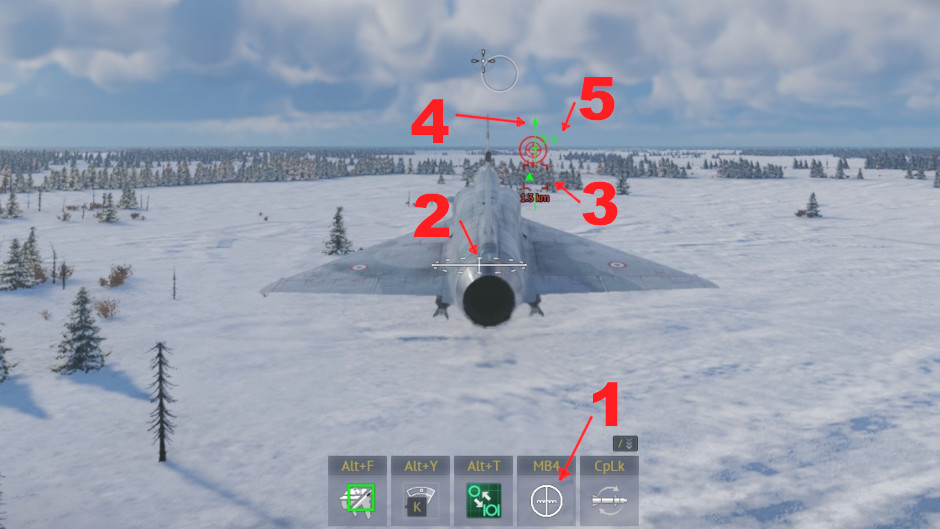
1. Automatic release icon
2. Bomb sight
3. Point of interest
4. Arrow is green - course is correct
5. Remaining time to target
Updated controls for CCRP bombing will arrive in the game in the next major update. Stay tuned for more news. Bombs away!
Comments (3)
Comments will be premoderatedI’m always happy to see continued work on the QoL side of things, and I hope this level of improvement and forward planning is reflected in other areas of the game like vehicle additions
ooh, this is a very very nice thing to see, i love it!
Holy shit that's the amx a-1a ghibli as the picture! Some hope for more Brazilian vehicles maybe?
Submit a complaint