
- For PC
- For MAC
- For Linux
- OS: Windows 10 (64 bit)
- Processor: Dual-Core 2.2 GHz
- Memory: 4GB
- Video Card: DirectX 11 level video card: AMD Radeon 77XX / NVIDIA GeForce GTX 660. The minimum supported resolution for the game is 720p.
- Network: Broadband Internet connection
- Hard Drive: 23.1 GB (Minimal client)
- OS: Windows 10/11 (64 bit)
- Processor: Intel Core i5 or Ryzen 5 3600 and better
- Memory: 16 GB and more
- Video Card: DirectX 11 level video card or higher and drivers: Nvidia GeForce 1060 and higher, Radeon RX 570 and higher
- Network: Broadband Internet connection
- Hard Drive: 75.9 GB (Full client)
- OS: Mac OS Big Sur 11.0 or newer
- Processor: Core i5, minimum 2.2GHz (Intel Xeon is not supported)
- Memory: 6 GB
- Video Card: Intel Iris Pro 5200 (Mac), or analog from AMD/Nvidia for Mac. Minimum supported resolution for the game is 720p with Metal support.
- Network: Broadband Internet connection
- Hard Drive: 22.1 GB (Minimal client)
- OS: Mac OS Big Sur 11.0 or newer
- Processor: Core i7 (Intel Xeon is not supported)
- Memory: 8 GB
- Video Card: Radeon Vega II or higher with Metal support.
- Network: Broadband Internet connection
- Hard Drive: 62.2 GB (Full client)
- OS: Most modern 64bit Linux distributions
- Processor: Dual-Core 2.4 GHz
- Memory: 4 GB
- Video Card: NVIDIA 660 with latest proprietary drivers (not older than 6 months) / similar AMD with latest proprietary drivers (not older than 6 months; the minimum supported resolution for the game is 720p) with Vulkan support.
- Network: Broadband Internet connection
- Hard Drive: 22.1 GB (Minimal client)
- OS: Ubuntu 20.04 64bit
- Processor: Intel Core i7
- Memory: 16 GB
- Video Card: NVIDIA 1060 with latest proprietary drivers (not older than 6 months) / similar AMD (Radeon RX 570) with latest proprietary drivers (not older than 6 months) with Vulkan support.
- Network: Broadband Internet connection
- Hard Drive: 62.2 GB (Full client)
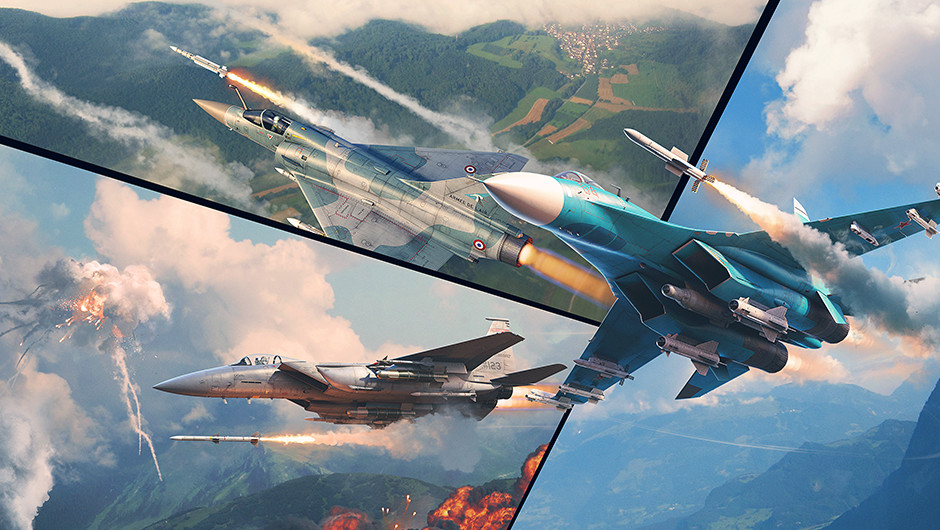
Today we’re continuing our coverage of the new features coming in the upcoming major update, this time focusing on aircraft weapons!
Comparison of missiles
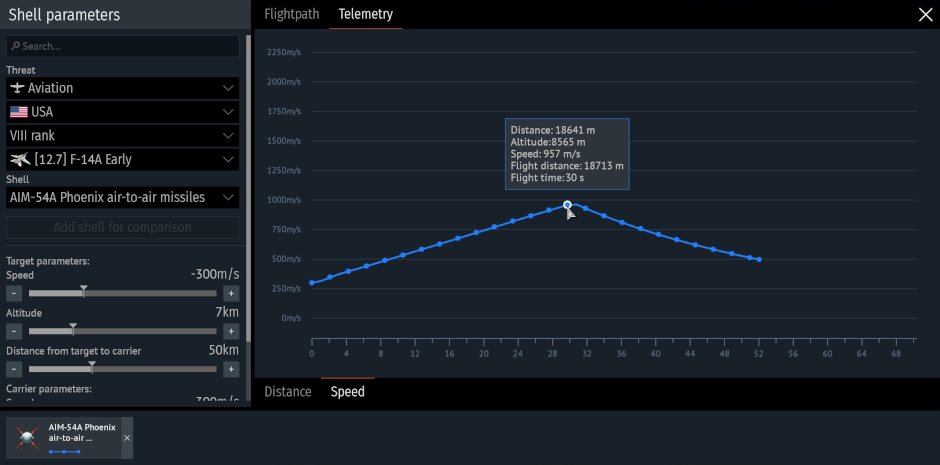
Recently, we added a ballistic comparison interface and armor penetration curves at different ranges to the Protection Analysis tab in the hangar for all shells and bullets in the game. In the upcoming major update, we’ll be introducing a comparison feature for guided weapons: air-to-air missiles and guided bombs!
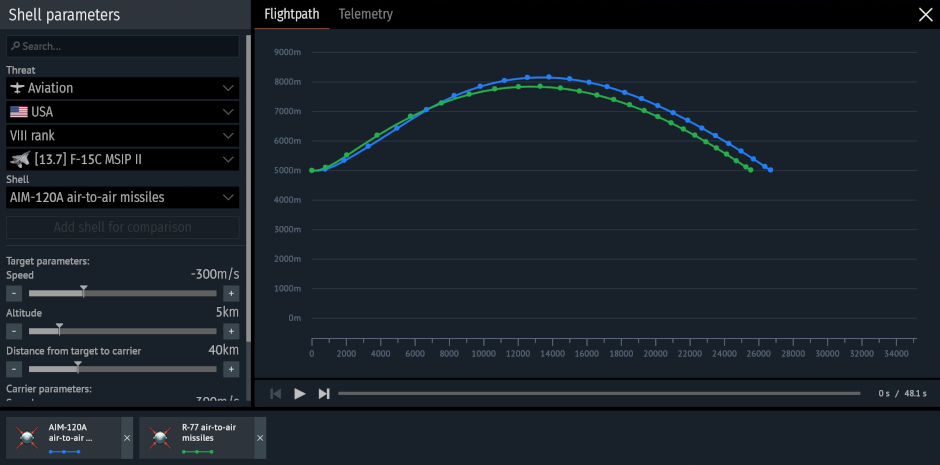
The missile parameter comparison interface is designed as a single window. On the left side is a settings section where you can set the initial launch conditions, which are consistent across all calculations: the altitude and speed of the launch vehicle and the target, as well as the distance at launch. In this section, you can also select guided missiles for comparison, and add or remove munitions from the aircraft and helicopter armament lists to compare the parameters of all missiles on a single screen.
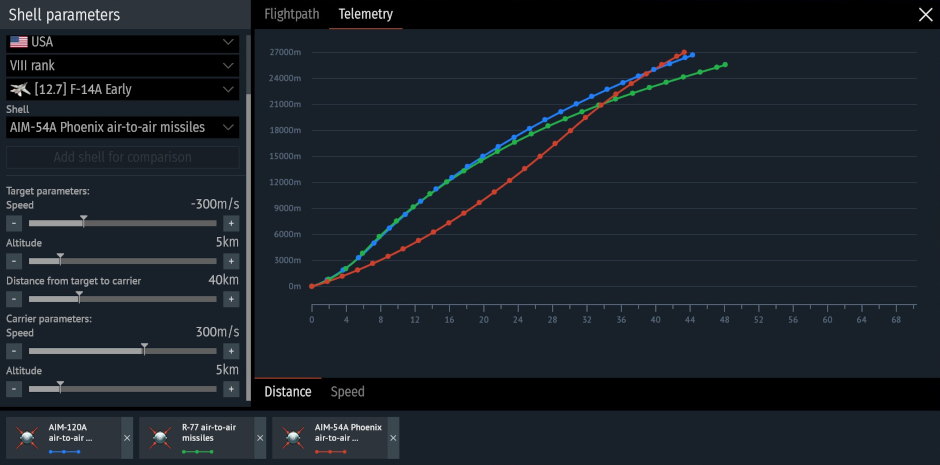
The central part of the window is occupied by a multi-layer trajectory graph, displaying curves for each selected munition in the “Trajectory” (change in the altitude and distance) and “Telemetry” (distance-time and speed-time curves) tabs. The graph dynamically changes as input data changes. This will allow you to see the missile’s characteristics at each point, including altitude, distance traveled, distance to target, and flight time, as well as observe changes in speed. Air combat in a single graph!
You can find the missile comparison interface by clicking the new button in the missile stat card in the Secondary weapons menu in the hangar.
More information on the minimap
In the previous major update, we added a minimap tracking feature for launched aircraft ordnance in air battles. After launching guided and unguided missiles, dropping bombs or other munitions, you could see their indicators on the minimap (default key: M), and you could also navigate to the selected ordnance in flight to track it closely (default key: U). Now, left-clicking on a projectile’s indicator will also display its name and current velocity!
Comments (19)
Comments will be premoderatedgaijin this is a nice! i want to see more like this change
Nice little QoL addition
Glad you like it.
This is nice! What I want next is that if you hover over someone on the map screen, it tells you what vehicle they are in whether it be allies or for spotted enemies in ARB
Does this mean, if we put the AIM120 A, B, C and D, we'll see just how they are actually different and not copy&paste of each other? Right?
if you think the velocity graphs should be different, you do not understand the A, B, C, and D changes. they have nothing to do with velocity. a quick googl will help you get up to speed (pun intended)
Sweet!
Minimap change is brilliant for learning new missiles!
Finaly we are getting better tracking and better comparison
So we are making nuclear options now
Will this be enable on console
I would love to see an angle of attack parameter get added to the telemetry data as well, as the mapped out trajectory arc is likely not to scale.
Submit a complaint