
- For PC
- For MAC
- For Linux
- OS: Windows 10 (64 bit)
- Processor: Dual-Core 2.2 GHz
- Memory: 4GB
- Video Card: DirectX 11 level video card: AMD Radeon 77XX / NVIDIA GeForce GTX 660. The minimum supported resolution for the game is 720p.
- Network: Broadband Internet connection
- Hard Drive: 23.1 GB (Minimal client)
- OS: Windows 10/11 (64 bit)
- Processor: Intel Core i5 or Ryzen 5 3600 and better
- Memory: 16 GB and more
- Video Card: DirectX 11 level video card or higher and drivers: Nvidia GeForce 1060 and higher, Radeon RX 570 and higher
- Network: Broadband Internet connection
- Hard Drive: 75.9 GB (Full client)
- OS: Mac OS Big Sur 11.0 or newer
- Processor: Core i5, minimum 2.2GHz (Intel Xeon is not supported)
- Memory: 6 GB
- Video Card: Intel Iris Pro 5200 (Mac), or analog from AMD/Nvidia for Mac. Minimum supported resolution for the game is 720p with Metal support.
- Network: Broadband Internet connection
- Hard Drive: 22.1 GB (Minimal client)
- OS: Mac OS Big Sur 11.0 or newer
- Processor: Core i7 (Intel Xeon is not supported)
- Memory: 8 GB
- Video Card: Radeon Vega II or higher with Metal support.
- Network: Broadband Internet connection
- Hard Drive: 62.2 GB (Full client)
- OS: Most modern 64bit Linux distributions
- Processor: Dual-Core 2.4 GHz
- Memory: 4 GB
- Video Card: NVIDIA 660 with latest proprietary drivers (not older than 6 months) / similar AMD with latest proprietary drivers (not older than 6 months; the minimum supported resolution for the game is 720p) with Vulkan support.
- Network: Broadband Internet connection
- Hard Drive: 22.1 GB (Minimal client)
- OS: Ubuntu 20.04 64bit
- Processor: Intel Core i7
- Memory: 16 GB
- Video Card: NVIDIA 1060 with latest proprietary drivers (not older than 6 months) / similar AMD (Radeon RX 570) with latest proprietary drivers (not older than 6 months) with Vulkan support.
- Network: Broadband Internet connection
- Hard Drive: 62.2 GB (Full client)
Today we’d like to talk about how we’re expanding the functionality of points of interest on top-tier aircraft!
It’s hard to surprise anyone with “smart” weapons in War Thunder anymore, but we’re going to try! In the upcoming major update, we’re implementing another feature for modern weapons systems: multiple aiming points!
Previously, the game only had a single, current point of interest. This made it difficult to fire guided weapons at multiple targets in a salvo, as manual targeting of each subsequent target required reorienting and finding it before launching, which increased the exposure to counterattacks from SAMs. With multiple aiming points, the time between launches, and consequently the time spent in the air defense zone is reduced, increasing the carrier’s chances of successfully returning to base.
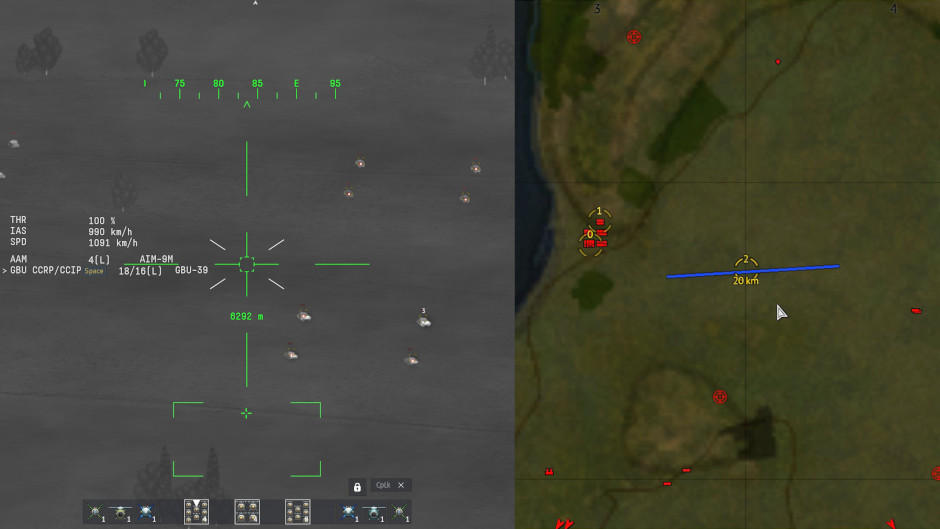
Please note! The mechanic is WIP. This is a non-final variant of the interface.
How will it work? All aircraft with GNSS-guided weapons will have the ability to set new waypoints — called aiming points — new markers independent of the point of interest. Essentially, these are simply saved coordinates. You’ll be able to set up to 10 aiming points (numbered 0 to 9), switch between them, delete and edit them, and move the point of interest to the current aiming point. This can be done either by using the assigned keys or via the tactical map.
Aiming points can be used for navigation purposes, for example to mark route points or danger zones, or to measure the range to specific targets, such as an airfield, as well as in combat for weapon launch. Now, it will be possible to first detect targets and “remember” their coordinates, and then, by switching between pre-marked points, guide and launch guided weapons. While weapons with IR or TV seekers will still require target acquisition before launch, and laser-guided munitions will require target designation, switching between multiple targets will be faster. This mechanic will be especially helpful against static or slow-moving enemies.
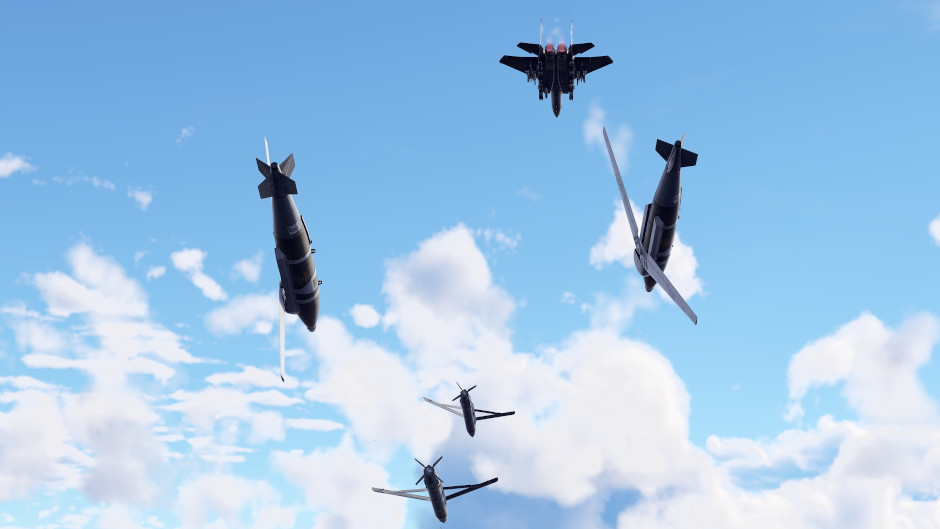
However, this mechanic will expand the capabilities of satellite-guided weapons more than any other, as bombs and missiles guided by GNSS data can be linked to aiming points and launched in a single salvo (with the option of the carrier being hidden from view by terrain). Ammunition can be linked in two modes: manual and automatic. In manual mode, you link a specific munition to the current aiming point, with the ability to link multiple munitions of different types to each if you want. In automatic mode, you simply set aiming points and launch a salvo of the selected weapon. This way, the drop will expend one munition per each aiming point, starting with 0.
You’ll be able to try out the expanded point-of-interest functionality in the game and bomb ground targets very soon! That’s all for now, see you in the next dev blog.
Please note that the mechanics may be refined and changed before being added to the game.


Comments (18)
Comments will be premoderatedAs a air main this is awesome, y’all have been cooking with new mechanics for aircraft
This is actually so nice, me and my buddies were actually talking about needing this just a month ago. Actually good and cool mechanic :D
Ok, now this is epic sauce
As someone who uses GNSS bombs all the time, especially in my A-10C and AV-8B (NA), This is huge!
a devious feature, I really like it
the Russian cas is as bad as it is already but hope this heavely buffs all other cas.
Top tier air is what made me get a razer naga. Good thing I just freed up a keybind lol
Submit a complaint