
- For PC
- For MAC
- For Linux
- OS: Windows 10 (64 bit)
- Processor: Dual-Core 2.2 GHz
- Memory: 4GB
- Video Card: DirectX 11 level video card: AMD Radeon 77XX / NVIDIA GeForce GTX 660. The minimum supported resolution for the game is 720p.
- Network: Broadband Internet connection
- Hard Drive: 23.1 GB (Minimal client)
- OS: Windows 10/11 (64 bit)
- Processor: Intel Core i5 or Ryzen 5 3600 and better
- Memory: 16 GB and more
- Video Card: DirectX 11 level video card or higher and drivers: Nvidia GeForce 1060 and higher, Radeon RX 570 and higher
- Network: Broadband Internet connection
- Hard Drive: 75.9 GB (Full client)
- OS: Mac OS Big Sur 11.0 or newer
- Processor: Core i5, minimum 2.2GHz (Intel Xeon is not supported)
- Memory: 6 GB
- Video Card: Intel Iris Pro 5200 (Mac), or analog from AMD/Nvidia for Mac. Minimum supported resolution for the game is 720p with Metal support.
- Network: Broadband Internet connection
- Hard Drive: 22.1 GB (Minimal client)
- OS: Mac OS Big Sur 11.0 or newer
- Processor: Core i7 (Intel Xeon is not supported)
- Memory: 8 GB
- Video Card: Radeon Vega II or higher with Metal support.
- Network: Broadband Internet connection
- Hard Drive: 62.2 GB (Full client)
- OS: Most modern 64bit Linux distributions
- Processor: Dual-Core 2.4 GHz
- Memory: 4 GB
- Video Card: NVIDIA 660 with latest proprietary drivers (not older than 6 months) / similar AMD with latest proprietary drivers (not older than 6 months; the minimum supported resolution for the game is 720p) with Vulkan support.
- Network: Broadband Internet connection
- Hard Drive: 22.1 GB (Minimal client)
- OS: Ubuntu 20.04 64bit
- Processor: Intel Core i7
- Memory: 16 GB
- Video Card: NVIDIA 1060 with latest proprietary drivers (not older than 6 months) / similar AMD (Radeon RX 570) with latest proprietary drivers (not older than 6 months) with Vulkan support.
- Network: Broadband Internet connection
- Hard Drive: 62.2 GB (Full client)
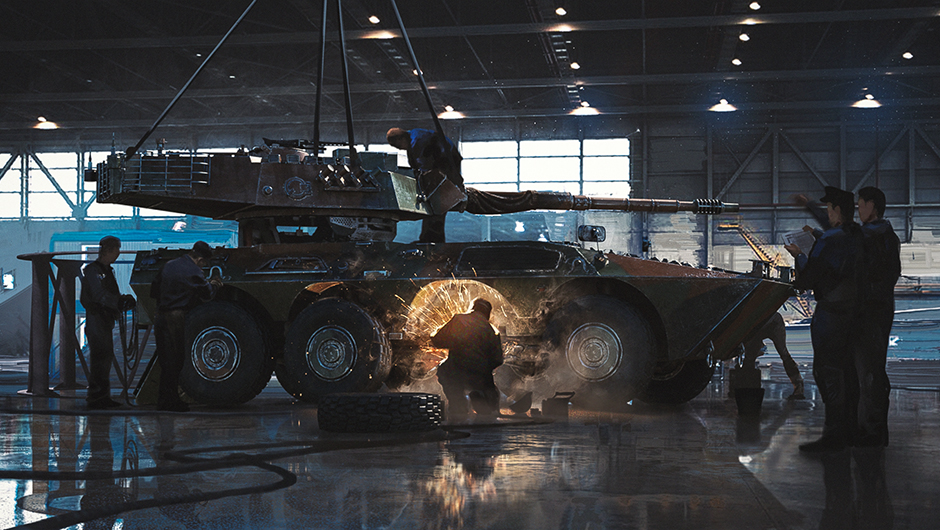
In today’s dev blog, we’re talking about new modules and features for ground vehicles!
Hey everyone! In the next major update, ground vehicle players can look forward to new functional modules, more detailed damage models, and new capabilities for their favorite vehicles. Let’s take a look at everything!
Fire Control System (FCS) and Electrical Systems
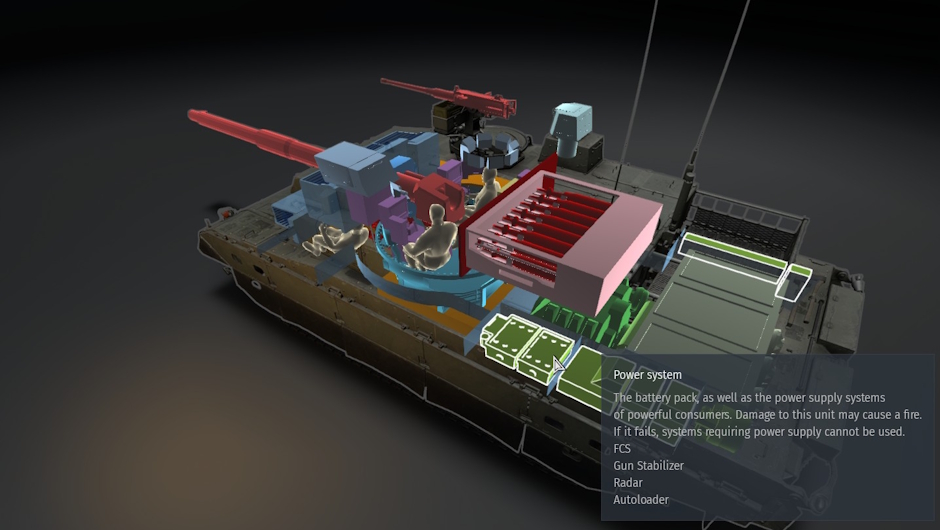
First up, you’ll notice new functional modules when using the X-ray view. The fire control system is now a distinct module that can be damaged or destroyed. If the FCS is disabled, the use of night-vision devices, thermal imagers and the rangefinder becomes unavailable. Furthermore, remotely operated machine-gun or cannon turrets that lack a manual aiming option will also be disabled.
Next is the new electrical system module, which is a critical component that powers the tank’s various systems. Disabling it shuts down a whole range of equipment that relies on power: the fire-control system, the gun stabilizer, radars, optoelectronic targeting systems, the threat-warning system, and even the autoloader. Make sure to learn the location of this module on all of your tanks (as well as your opponents, most importantly!), because a well-placed shot here will give you a massive advantage!
Manual Reloading for Tanks with an Autoloader
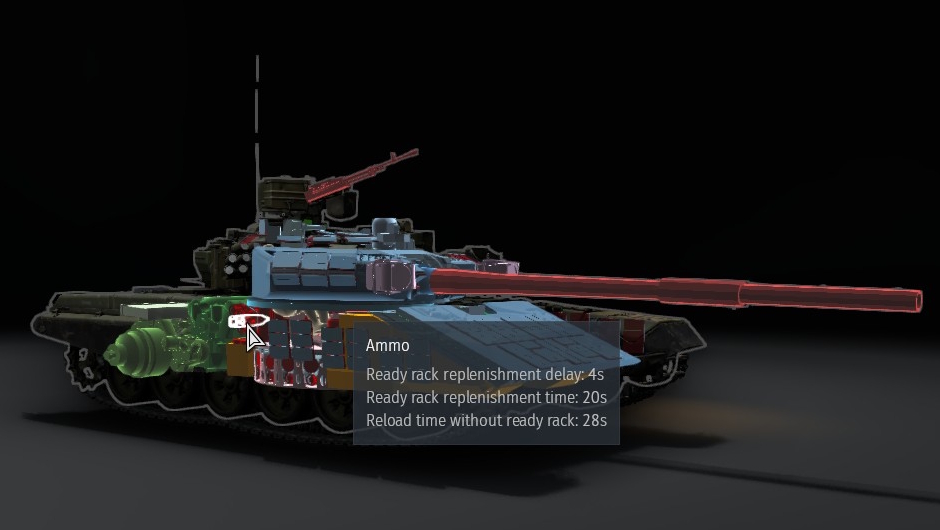
In the next major update, we’ll be introducing a mechanic that will allow you to manually reload ammunition for tanks equipped with an autoloader. This will be available for tanks that have this capability in real life. So how does it work? Now, when the shells in the automatic loader are depleted or the autoloader is disabled, the crew will switch to loading the gun manually. If the loader is manually loading the gun however, the autoloader rack will not be replenished — you will have to stop firing for the loader to resume refilling it.
In the X-ray view in the hangar, you will be able to see the reload times for shells stored outside of the ready rack or the autoloader. The delay period before the ready rack begins to be replenished is also displayed. Additionally, the X-ray view shows the time required to replenish the autoloader or the ready rack. This provides a complete picture of how the loading system functions and highlights its weak points.
The new mechanic makes the behavior of tanks equipped with an autoloader more realistic and predictable. At the same time, it preserves tactical depth, because disabling the autoloader directly affects the rate of fire.
Auxiliary Power Unit
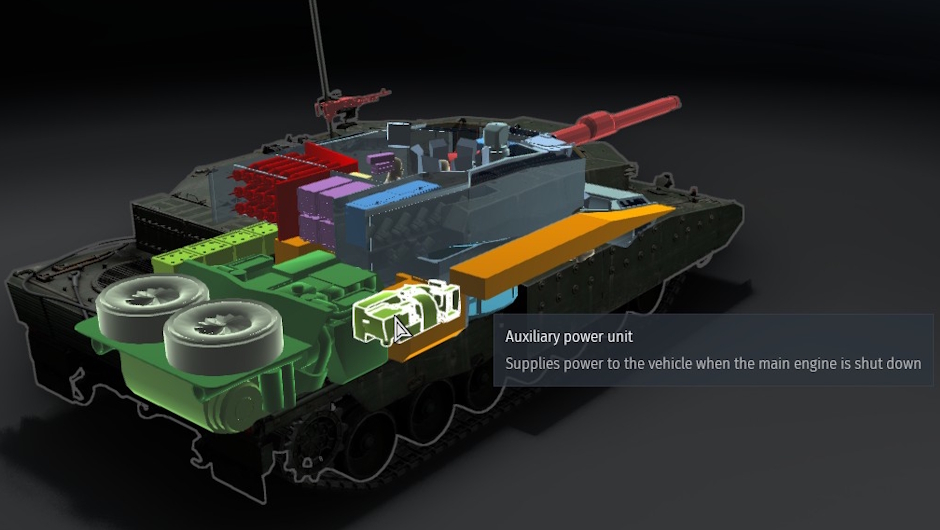
We’re also adding an auxiliary power unit (APU) mechanic. Previously, if a tank’s engine was disabled and the battery was depleted, the vehicle would lose all power: the turret could only be traversed manually, aiming the gun became difficult, and all electronics would shut down. Now, many vehicles will have a “second heart” that keeps their electric systems operational, even if the engine has been destroyed.
The APU is implemented as a separate module that can be viewed in X-ray view. This allows you to see exactly where it is located on a given vehicle and how vulnerable it is. If an opponent destroys the power system, the APU will be unable to power the tank’s systems. Consequently, disabling the engine no longer results in an eventual total loss of power for the vehicle. However, keep in mind that the APU itself can still be rendered inoperable due to other types of damage. During combat, the APU can be switched off to prevent the noise of its operation from revealing your tank’s position.
It’s also worth noting that on many SPAAs and SAMs the APU is always working to ensure the functionality of power-hungry systems, such as radars, powerful FCS or aiming drives. These APUs will work constantly and disabling them would cause the power intensive systems to stop functioning.
That’s it for this one, we’ll be back soon with more information on the new mechanics related to turning and mobility of ground vehicles. Stay tuned!

Comments (0)
Comments will be premoderatedSubmit a complaint